
Documentation
Menu Designer
The menu designer makes it easy to create and modify menu bars and popup menus. It supports in-place-editing menu texts and drag-and-drop menu items.
Menu bar structure
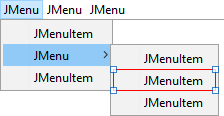
This figure shows the structure of a menu bar. The horizontal bar on top of the
image is a JMenuBar that contains JMenu components. The JMenu contains
JMenuItem, JCheckBoxMenuItem, JRadioButtonMenuItem or Menu Separator
components. To create a sub-menu, put a JMenu into a JMenu.
The component palette provides a category "Menus" that contains all components necessary to create menus.
Creating menu bars
To create a menu bar:
- add a
JMenuBarto aJFrame - add
JMenusto theJMenuBarand - add
JMenuItemsto theJMenus
Select the necessary components in the Palette and drop them to the Design view.
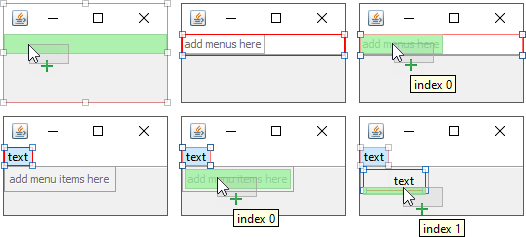
You can freely drag and drop the various menu components to rearrange them.
Creating popup menus
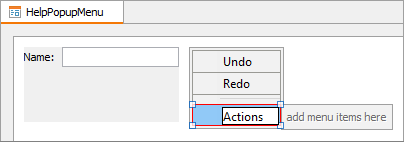
To create a popup menu:
- add a
JPopupMenuto the free area in the Design view and - add
JMenuItemsto theJPopupMenu
Assign popup menus to components
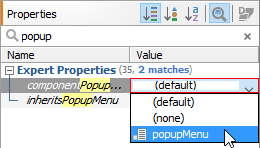
You can assign a popup menu to a component in the properties view using the "componentPopupMenu" property. Select the component to which you want attach the popup menu and assign it in the Properties view. Note that you must expand the Expert Properties category to see the property. Or use search as in the screenshot below.