

Documentation
TableLayout
The table layout manager places components in a grid of columns and rows, allowing specified components to span multiple columns or rows. Not all columns/rows necessarily have the same width/height.
A column/row can be given an absolute size in pixels, a percentage of the available space, or it can grow and shrink to fill the remaining space after other columns/rows have been resized.
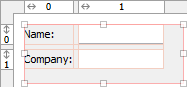
Use the column and row headers to insert or delete columns/rows and change column/row properties.
TableLayout is open source and not part of the standard Java distribution.
You must ship an additional library with your application. JFormDesigner
includes TableLayout.jar in its
redistributables. For more documentation and
tutorials, visit
www.clearthought.info/sun/products/jfc/tsc/articles/tablelayout/.
Maven Central Repository: groupId: tablelayout artifactId:
TableLayout version: 20050920
API documentation:
doc.formdev.com/tablelayout/
Source code:
github.com/JFormDesigner/swing-tablelayout
IDE plug-ins: If you use TableLayout the first time, the JFormDesigner IDE plug-in ask you whether it should copy the required library (and its source code and documentation) to the IDE project and add it to the classpath of the IDE project.
Extensions
JFormDesigner extends the original TableLayout with following features:
- Default component alignment
Allows you to specify a default alignment for components within columns/rows. This is very useful for columns with right aligned labels because you specify the alignment only once for the column and all added labels will automatically aligned to the right.
Layout manager properties
A container with this layout manager has following layout manager properties:
| Property Name | Description | Default |
|---|---|---|
| horizontal gap | The horizontal gap between components. | 5 |
| vertical gap | The vertical gap between components. | 5 |
Column/row properties
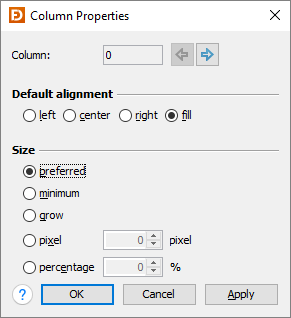
Each column and row has its own properties. Use the column and row headers to change column/row properties.
| Field | Description |
|---|---|
| Column/Row | The index of the column/row. Use the arrow buttons (or Alt+Left, Alt+Right, Alt+Up, Alt+Down keys) to edit the properties of the previous or next column/row. |
| Default alignment | The default alignment of the components within a column/row. Used if the value of the constraints properties "h align" or "v align" is DEFAULT. |
| Size | Specifies how TableLayout computes the width/height of a column/row. |
Tip: The column/row context menu allows you to alter many of these options for multi-selections.
Layout constraints properties
A component contained in a container with this layout manager has following layout constraints properties:
| Property Name | Description | Default |
|---|---|---|
| grid x | Specifies the component's horizontal grid origin (column index). | 0 |
| grid y | Specifies the component's vertical grid origin (row index). | 0 |
| grid width | Specifies the component's horizontal grid extend (number of columns). | 1 |
| grid height | Specifies the component's vertical grid extend (number of rows). | 1 |
| h align | The horizontal alignment of the component within its cell. Possible values: DEFAULT, LEFT, CENTER, RIGHT and FILL. | DEFAULT |
| v align | The vertical alignment of the component within its cell. Possible values: DEFAULT, TOP, CENTER, BOTTOM and FILL. | DEFAULT |
In contrast to the TableLayoutConstraints API, which uses [column1,row1,column2,row2] to specify the location and size of a component, JFormDesigner uses the usual [x,y,width,height] notation.
Tip: The component context menu allows you to alter the alignment for multi-selections.